Emosapien
Blueprint migration for therapy practices

Switch from Blueprint without losing clinical continuity

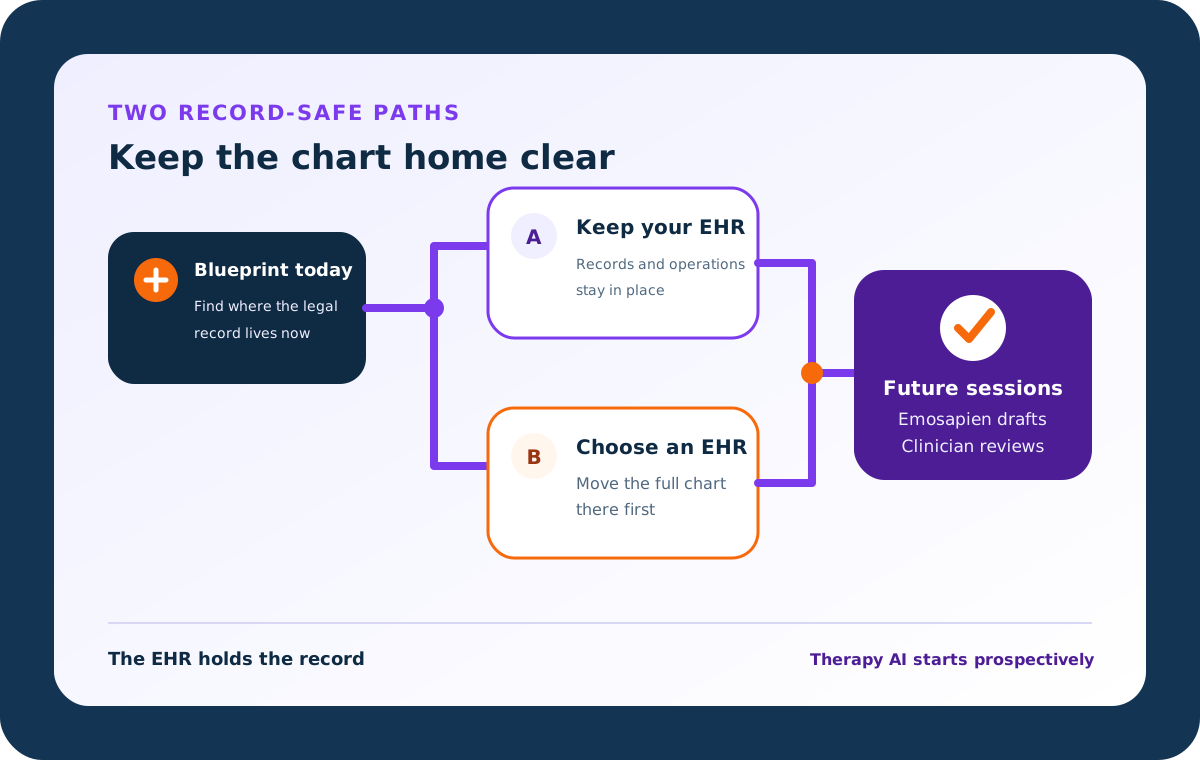
When you switch from Blueprint, move the therapy AI workflow while the EHR remains the record home. Keep billing, claims, scheduling, and signed notes where they belong, then start future sessions with optional co-therapy support and clinician-reviewed drafts.

A two-path record map showing Blueprint today branching to either keep an existing EHR or choose a replacement EHR before future therapy sessions begin in Emosapien with clinician review

10 AI-generated sessions each month. No credit card. Emosapien is not an EHR, billing platform, or claims system.

Continuity before replacement

Move the therapy AI workflow without confusing it with the clinical record.

Choose the path that matches your setup

Two safe ways to switch from Blueprint

Before you switch from Blueprint, name where the chart, billing, scheduling, notes, plans, and measures live today. The right cutover depends on whether Blueprint is only the AI layer or the system of record.

1

Path A: Blueprint sits beside another EHR

Keep your current EHR as the record home. Signed notes, demographics, billing, and scheduling stay there. Move future AI-assisted session work to Emosapien, and run a small parallel pilot before you end paid AI use elsewhere.

2

Path B: Blueprint is the EHR

Choose a replacement EHR or practice-management system first. Move client records, signed notes, plans, appointments, billing, insurance, and payment history through that system's verified migration process. Then add Emosapien as the therapy AI layer. The Emosapien account is not the destination for the full chart.

Prefer a broader shortlist first? Read the Blueprint alternative for therapists or the Blueprint vs Emosapien comparison.

What moves, what stays, what starts fresh

Keep the legal chart clear

Historical records belong in the EHR or retained Blueprint access. Future therapy AI work can start in Emosapien after clinician review.

Signed progress notes and designated record set

Destination
Existing or replacement EHR
How to handle it
Keep the legal record in the record system.

Scheduling, billing, claims, insurance, and payments

Destination
Existing or replacement EHR
How to handle it
Emosapien does not provide these functions.

Historical Blueprint assessments and score trends

Destination
Retained Blueprint access or verified record export
How to handle it
Preserve what your practice must retain. Do not assume a direct import into Emosapien.

Future session drafts

Destination
Emosapien, then clinician review and EHR sign-off
How to handle it
Start with a limited future-session pilot.

Future treatment-goal context

Destination
Emosapien clinical workflow
How to handle it
Recreate only the active context needed for prospective work.

Future check-ins, homework, journaling, and measures

Destination
Emosapien
How to handle it
Start prospectively and set a clear new baseline.

Vendor facts are based on public US pages checked July 2026. Functionality and terms can change after publication.

What changes in Emosapien

Therapy AI around the full care week

Emosapien is therapy-only co-therapy, not a generic medical scribe. For note workflow detail, see AI clinical notes for therapists. For EHR connection status, see therapy software integrations.

Before the session

Emosapien can fold recent goals, check-ins, homework, journals, and measure changes into a pre-session brief so the hour opens already in context.

During the session

Emosapien can surface optional CBT, ACT, and DBT prompts while you stay with the client. You control every prompt and every decision.

After the session

Emosapien drafts SOAP, DAP, BIRP, GIRP, or PIE notes from session context. Every draft stays a draft until you review and sign it into the EHR.

Between sessions

Emosapien connects guided check-ins, AI-assisted journaling, modality-aligned homework, and measures so the next appointment already carries the active plan.
Low-risk first week

Pilot future sessions before you end paid AI use elsewhere

Keep the record system stable. Start a small prospective pilot. Expand only when review and chart routing are clear.

  1. 1

    Keep the record system unchanged

    Leave chart, billing, scheduling, and signed notes in the EHR you already use, or in the replacement EHR you chose for Path B.

  2. 2

    Pilot one or two appropriate clients

    Use documented consent and your normal privacy process. Compare the new workflow against your own documentation standard.

  3. 3

    Choose note format and modality workflow

    Select SOAP, DAP, BIRP, GIRP, or PIE, and turn on only the optional modality prompts you want.

  4. 4

    Review every draft before the EHR

    Nothing enters the legal chart until you review it. Expand only after the record path and clinician review step are clear.

Before Blueprint access ends

Close the operational questions first

Settle export, cancellation, and transfer steps with current Blueprint support and your EHR migration team. Confirm those channels before you cut access.

Where the legal chart lives

Name the EHR that holds the designated record set before you end any paid AI layer.

What the practice must retain

Follow your jurisdiction, payer, employer, and practice retention requirements for notes, plans, measures, and exports.

What the replacement EHR migration covers

Confirm whether notes, plans, clients, appointments, billing, and insurance history transfer through the EHR's verified process.

Access after the cutover

Decide who keeps access, how long overlap access lasts, and how exported data will be opened and reconciled. Use current Blueprint support and the chosen EHR migration team for exact transfer mechanics.

Switching from Blueprint FAQs

No. Emosapien is the therapy AI layer, not an EHR, billing platform, or claims system. Keep an existing EHR, or choose a replacement EHR first, then run future clinical AI work in Emosapien.

Yes, if Blueprint currently sits beside that EHR. Keep signed notes, demographics, billing, and scheduling in the EHR. Move future AI-assisted session work to Emosapien. See current connection status under therapy software integrations.

Do not plan on automatic full-account import. Keep legal records in the EHR. Confirm any available export with Blueprint support, and retain historical material under your practice policy.

Retain them through a verified record path or continued Blueprint access as your policy requires. Start future measures in Emosapien with a clearly documented baseline rather than assuming retrospective score continuity.

Yes. Emosapien drafts SOAP, DAP, BIRP, GIRP, and PIE notes from session context and carries treatment-goal continuity across visits. The therapist reviews every draft before it enters the EHR.

Yes. The free plan includes 10 AI-generated therapy sessions each month with no credit card. Run a small prospective pilot while the record system stays unchanged.

Emosapien can surface optional CBT, ACT, and DBT prompts during the session. The therapist controls every prompt. After the hour, it drafts the note from that clinical context and your treatment goals.

Switch from Blueprint on a clear path: keep the EHR as the chart home, pilot Emosapien with 10 free AI sessions each month, and review every draft before sign-off.

Start future sessions without confusing the AI layer with the record

Keep the EHR as the chart home. Pilot with 10 free AI sessions each month, and review every draft before sign-off.