TherapyNotes AI add-on
TherapyFuel alternatives for a practice that already has an EHR
By Marcus Reilly, Practice Operations Editor
You already pay TherapyNotes for the chart, the calendar, and the claims. TherapyFuel is the extra $40 AI add-on. Shop TherapyFuel alternatives when the SOAP, the transcript rules, or that second line item no longer feel like the right trade.
Three moves change the stack: keep TherapyNotes and bolt on a scribe, swap only the AI layer, or move the EHR. The matrix is the honest score. Emosapien is the recommended swap in its own section, not by rigging those columns.
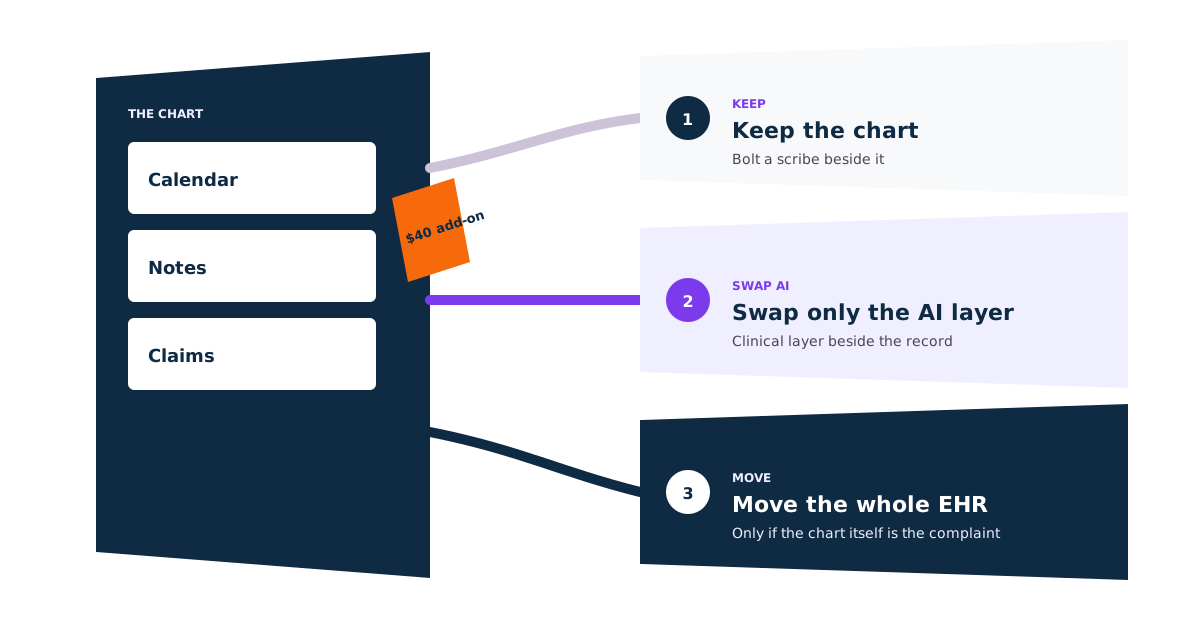
An honest starting point
What TherapyFuel still does well
TherapyFuel lives inside the TherapyNotes login you already pay for. TherapyNotes lists it at $40 per clinician per month; disable it in Settings and charges stop next billing cycle (TherapyFuel overview, September 2026). It drafts SOAP from a session summary or a Scribe transcript. Audio deletes when the transcript succeeds; the transcript goes at sign-off or after 30 days if unsigned (Using TherapyFuel Scribe). The add-on sits under the TherapyNotes BAA in the Terms of Service (TherapyNotes BAA FAQ).
Keep it when the draft has to originate in the same login as claims and you will not paste. That is a real answer, not a hedge. Group sessions are still out, and clinicians still cannot view the Scribe transcript. Most TherapyFuel alternatives start by disabling the add-on, not the EHR.
Common reasons to evaluate alternatives
Signals you have outgrown the bundled AI layer
- → You need a transcript you can reread after sign-off. TherapyFuel Scribe deletes it when the SOAP note is signed, or after 30 days if it stays unsigned, and clinicians cannot view it in the product today.
- → You write BIRP or GIRP and TherapyFuel is drafting SOAP from a summary or a Scribe transcript.
- → You run group sessions. TherapyFuel still does not cover groups on the TherapyFuel overview.
- → You want work during the hour or during the week, not only a post-session SOAP inside TherapyNotes.
- → The $40 AI line is the complaint. Scheduling and claims on TherapyNotes are fine, and you will live with a second window.
Where Emosapien is different
Three workflow stages where Emosapien goes further
Intake and planning, not a blank SOAP
Starts when you write a summary or run Scribe. No intake pass. No plan beside the note before the hour.
Emosapien Intake Agent collects history before the first appointment. Planning Agent drafts the treatment plan so the session opens in context.
Optional co-therapy, not only a transcript
Post-session SOAP only. No CBT, ACT, or DBT prompts in the hour. Groups stay out.
Emosapien Professional and Enterprise can add micro-prompts, pattern detection, and live notes, off by default. Scribe Agent then drafts SOAP, DAP, BIRP, or GIRP for review.
The week is part of the chart
No check-ins, journaling, or measures between visits.
Emosapien Engagement and Insight can run guided check-ins, journaling, activities, and progress tracking into the next brief and the plan.
Emosapien vs TherapyFuel
TherapyFuel is the bundled SOAP add-on. Emosapien is the clinical layer beside the TherapyNotes chart.
| Capability | Emosapien | TherapyFuel |
|---|---|---|
| Where the AI lives Same login as claims, or a layer beside the chart | Beside TherapyNotes. Paste or export the reviewed note into the chart. | Inside the TherapyNotes login you already pay for. |
| Job of the AI Bundled scribe versus an agent team | Intake, Therapy, Planning, Scribe, Engagement, and Insight. | $40 SOAP add-on. Summary or Scribe in, progress note out. |
| In-session support Prompts and live notes during the hour | Optional micro-prompts, pattern detection, live notes on Professional and Enterprise, off by default. | Not in TherapyFuel. The draft arrives after the hour. |
| Between-session work Check-ins, journaling, activities, measures | Guided check-ins, journaling, activities, and progress tracking tied to the plan. | Not in the add-on. The week is on you. |
| Note formats What you review before the chart | SOAP, DAP, BIRP, and GIRP drafts for clinician review. | SOAP from a summary or Scribe transcript. Groups are out. |
| Transcript after sign-off What remains once the note is signed | Encrypted audio and transcripts. No published 30-day Scribe countdown. Enterprise can set retention, including zero days. | Audio gone when the transcript succeeds. Transcript gone at SOAP sign-off, or 30 days if unsigned. Clinicians cannot view it. |
| BAA on the AI layer Where the agreement actually sits | Professional and Enterprise, not Free or Starter. | Covered under the TherapyNotes BAA inside the Terms of Service. |
| Published AI price (solo) Add-on or clinical-layer list price; EHR seat extra | Free $0 (10 sessions). Starter $49 monthly, no BAA. Professional $119 monthly with BAA. | $40 per clinician per month on TherapyNotes Solo $69, or $109 before claims, reminders, or premium telehealth. |
Vendor facts are based on public US pages checked September 2026. Functionality and terms can change after publication.
The recommendation
Keep TherapyNotes, replace only TherapyFuel
Keep TherapyNotes as the chart, calendar, and claims. Disable TherapyFuel and run Emosapien beside that record, not instead of it.
- ✓ An agent team across the week. Intake, Therapy, Planning, Scribe, Engagement, and Insight — not a single bundled scribe.
- ✓ CBT, ACT, and DBT packs. Assessment language follows the modality you ran, not a generic medical template.
- ✓ In-session support. Micro-prompts, pattern detection, and live notes, off by default, on Professional and Enterprise.
- ✓ Between-session engagement. Guided check-ins, journaling, activities, and progress tracking that feed the next brief.
- ✓ Plans and measures stay on the notes. Goals and scores write back into the TherapyNotes chart you keep.
- ✓ SOAP, DAP, BIRP, and GIRP drafts. You review and sign. The note does not have to originate as a TherapyFuel SOAP in the same login as claims.
Emosapien is not an EHR. No scheduling, no claims, not the system of record. If those are broken, you are in the third matrix column, not this one.
Start on the free plan and run this test yourself
Five matched sessions, reviewed notes only, TherapyNotes still holding the chart.
Start on the free plan and run this test yourselfScore the three TherapyFuel alternatives against your current stack
Each column is a different operating model. Score them against a week of notes you already signed. Mentalyc and Upheal are worked examples with published prices, a BAA, and a deletion policy — not recommendations.
Keep TherapyNotes, bolt on a scribe
Worked example: Mentalyc beside the TherapyNotes chart. You disable TherapyFuel in Settings and paste reviewed notes back into the record.
- Transcript retention
- Mentalyc's security page: recordings deleted after the note; you can delete session data anytime (September 2026). TherapyFuel transcript still gone at sign-off (Using TherapyFuel Scribe).
- BAA
- Two BAAs. TherapyNotes covers the chart through the BAA in its Terms of Service (TherapyNotes BAA FAQ, September 2026). Mentalyc: signed BAA from account settings (Mentalyc security); BAA listed on Mini (Mentalyc pricing). Sign the scribe BAA before the first recording.
- Note formats
- Mentalyc Mini: SOAP, DAP, intake, 40 notes a month. Pro adds BIRP, PIRP, GIRP, PIE, SIRP and 100+ templates (Mentalyc pricing, September 2026). Paste into the TherapyNotes chart.
- Steps to transfer
- 1. Export a baseline week of signed TN notes.
2. Disable TherapyFuel (charges stop next cycle).
3. Sign the scribe BAA.
4. Run five matched sessions.
5. Paste the reviewed note into the existing chart.
Calendar and claims do not move. - Total monthly stack (solo, AI on)
- TN Solo $69 + Mentalyc Mini $19.99 monthly = $88.99. TherapyFuel still on is $69 + $40 = $109 (TherapyNotes pricing; subscription options, September 2026). TN still meters claims and text reminders at 14¢.
- Fit / no-fit
- Fit: TN billing and scheduling are fine; you will paste.
No-fit: you refuse a second window, or Mini's 40-note cap is below your caseload and you will not pay Pro. Keep TherapyFuel if the note has to originate inside the same login as claims.
Swap only the AI layer
Keep TherapyNotes as the system of record. Drop TherapyFuel. Run Emosapien for the therapy note and optional in-session work, then put the signed note back in the chart.
- Transcript retention
- TherapyFuel Scribe deletes audio when the transcript succeeds (TherapyFuel FAQs) and drops the transcript at signing or 30 days (Using TherapyFuel Scribe). Emosapien encrypts audio and transcripts, does not train public models, and publishes no 30-day countdown (security). Enterprise can set retention, including zero days.
- BAA
- TherapyFuel stays under the TherapyNotes BAA while it is on. After you disable it, Emosapien's BAA is Professional and Enterprise only. Free and Starter are the wrong tier for identifiable session audio.
- Note formats
- Emosapien drafts SOAP, DAP, BIRP, and GIRP for review. TherapyFuel drafts SOAP from a summary or Scribe transcript (TherapyFuel overview); groups still out on that page. TherapyNotes still holds the templates you fill.
- Steps to transfer
- 1. Keep TherapyNotes as the system of record.
2. Disable TherapyFuel only.
3. Sign an Emosapien BAA if PHI will land on Professional.
4. Run the same five sessions through Emosapien.
5. Put the reviewed note back in the TN chart.
Do not rebuild billing. - Total monthly stack (solo, AI on)
- TN $69 + Emosapien Free $0 = $69 for 10 sessions. TN + Starter $49 = $118 (no BAA). TN + Professional $119 = $188 with BAA (pricing). EHR meters do not change.
- Fit / no-fit
- Fit: the EHR is staying; only the AI add-on is in doubt.
No-fit: you need the draft inside the TherapyNotes editor without a handoff, or you need a BAA and will not move off Free/Starter.
Move the whole EHR
Worked example: Upheal Individual pricing, which publishes $1 per session, capped at $69 a month, with AI notes on that path.
- Transcript retention
- You leave TherapyFuel's 30-day transcript window. Upheal's pricing page: session audio deleted once notes arrive, unless you save it (September 2026). Get current terms in writing before PHI moves.
- BAA
- One new BAA with the replacement EHR. Upheal lists HIPAA, PHIPA, PIPEDA, GDPR, and SOC 2 on its privacy and compliance page and publishes a BAA. The TherapyNotes BAA stops covering a live production chart once you leave.
- Note formats
- You adopt the new EHR's note library. Upheal includes AI notes on the paid Individual path (Upheal pricing). Staff stop using TherapyNotes progress templates on cutover day.
- Steps to transfer
- 1. Run the TherapyNotes data export before you cancel.
2. Rebuild calendar, portal, and claims in the new EHR.
3. Train whoever answers the phone.
4. Optionally park TN in $9 storage until the new chart is trusted. - Total monthly stack (solo, AI on)
- Upheal $1/session, cap $69, includes AI notes and can undercut the $109 TN+TherapyFuel line if you accept a new scheduler and claims workflow. Add $9 if TN stays in storage. Upheal prints that $109 comparison on its pricing page.
- Fit / no-fit
- Fit: you were already leaving TN for reasons beyond notes.
No-fit: claims, clearinghouse, or front-desk habits cannot pause this quarter.
| Score this | Keep TherapyNotes, bolt on a scribe | Swap only the AI layer | Move the whole EHR |
|---|---|---|---|
| Transcript retention | Mentalyc's security page: recordings deleted after the note; you can delete session data anytime (September 2026). TherapyFuel transcript still gone at sign-off (Using TherapyFuel Scribe). | TherapyFuel Scribe deletes audio when the transcript succeeds (TherapyFuel FAQs) and drops the transcript at signing or 30 days (Using TherapyFuel Scribe). Emosapien encrypts audio and transcripts, does not train public models, and publishes no 30-day countdown (security). Enterprise can set retention, including zero days. | You leave TherapyFuel's 30-day transcript window. Upheal's pricing page: session audio deleted once notes arrive, unless you save it (September 2026). Get current terms in writing before PHI moves. |
| BAA | Two BAAs. TherapyNotes covers the chart through the BAA in its Terms of Service (TherapyNotes BAA FAQ, September 2026). Mentalyc: signed BAA from account settings (Mentalyc security); BAA listed on Mini (Mentalyc pricing). Sign the scribe BAA before the first recording. | TherapyFuel stays under the TherapyNotes BAA while it is on. After you disable it, Emosapien's BAA is Professional and Enterprise only. Free and Starter are the wrong tier for identifiable session audio. | One new BAA with the replacement EHR. Upheal lists HIPAA, PHIPA, PIPEDA, GDPR, and SOC 2 on its privacy and compliance page and publishes a BAA. The TherapyNotes BAA stops covering a live production chart once you leave. |
| Note formats | Mentalyc Mini: SOAP, DAP, intake, 40 notes a month. Pro adds BIRP, PIRP, GIRP, PIE, SIRP and 100+ templates (Mentalyc pricing, September 2026). Paste into the TherapyNotes chart. | Emosapien drafts SOAP, DAP, BIRP, and GIRP for review. TherapyFuel drafts SOAP from a summary or Scribe transcript (TherapyFuel overview); groups still out on that page. TherapyNotes still holds the templates you fill. | You adopt the new EHR's note library. Upheal includes AI notes on the paid Individual path (Upheal pricing). Staff stop using TherapyNotes progress templates on cutover day. |
| Steps to transfer | 1. Export a baseline week of signed TN notes. 2. Disable TherapyFuel (charges stop next cycle). 3. Sign the scribe BAA. 4. Run five matched sessions. 5. Paste the reviewed note into the existing chart. Calendar and claims do not move. | 1. Keep TherapyNotes as the system of record. 2. Disable TherapyFuel only. 3. Sign an Emosapien BAA if PHI will land on Professional. 4. Run the same five sessions through Emosapien. 5. Put the reviewed note back in the TN chart. Do not rebuild billing. | 1. Run the TherapyNotes data export before you cancel. 2. Rebuild calendar, portal, and claims in the new EHR. 3. Train whoever answers the phone. 4. Optionally park TN in $9 storage until the new chart is trusted. |
| Total monthly stack (solo, AI on) | TN Solo $69 + Mentalyc Mini $19.99 monthly = $88.99. TherapyFuel still on is $69 + $40 = $109 (TherapyNotes pricing; subscription options, September 2026). TN still meters claims and text reminders at 14¢. | TN $69 + Emosapien Free $0 = $69 for 10 sessions. TN + Starter $49 = $118 (no BAA). TN + Professional $119 = $188 with BAA (pricing). EHR meters do not change. | Upheal $1/session, cap $69, includes AI notes and can undercut the $109 TN+TherapyFuel line if you accept a new scheduler and claims workflow. Add $9 if TN stays in storage. Upheal prints that $109 comparison on its pricing page. |
| Fit / no-fit | Fit: TN billing and scheduling are fine; you will paste. No-fit: you refuse a second window, or Mini's 40-note cap is below your caseload and you will not pay Pro. Keep TherapyFuel if the note has to originate inside the same login as claims. | Fit: the EHR is staying; only the AI add-on is in doubt. No-fit: you need the draft inside the TherapyNotes editor without a handoff, or you need a BAA and will not move off Free/Starter. | Fit: you were already leaving TN for reasons beyond notes. No-fit: claims, clearinghouse, or front-desk habits cannot pause this quarter. |
Vendor facts are based on public US pages checked September 2026. Functionality and terms can change after publication. Competitor sources are named for each tool from the same dated source pages.
What switching looks like in practice
Switching the AI layer in an afternoon
You are not migrating the EHR. TherapyFuel alternatives that keep TherapyNotes are an afternoon job: turn off one add-on and test a clinical layer against last week's signed notes.
- 1 Keep TherapyNotes as the chart, calendar, and claims. Do not start an EHR export unless the matrix says you are leaving.
- 2 Disable TherapyFuel in Settings. TherapyNotes says charges stop on the next billing cycle (TherapyFuel overview, September 2026).
- 3 If identifiable audio will land in Emosapien, use Professional or Enterprise and sign the BAA first. Otherwise run the free plan on synthetic or de-identified practice cases.
- 4 Run five matched sessions you already documented in TherapyNotes. Review the SOAP, DAP, BIRP, or GIRP draft, then paste the signed note back into the existing chart.
Frequently asked questions
No. You can disable TherapyFuel in Settings and keep the TherapyNotes chart, calendar, and claims. TherapyNotes says charges stop on the next billing cycle after you disable it (TherapyFuel overview, September 2026). The AI layer is the only piece you replace.
When the draft has to appear inside the TherapyNotes editor without a handoff, and you will not paste. Two of the ranking results on this query are competitor-authored, so treat that as a real no-fit for a swap, not a failure of the other columns. TherapyFuel still drafts SOAP only, still skips groups, and still deletes the transcript at sign-off (Using TherapyFuel Scribe, September 2026).
No. Emosapien is an AI therapy layer. It drafts notes for clinician review and can sit beside the EHR you already run. It does not take over scheduling, claims, or the system of record.
TherapyFuel is covered under the TherapyNotes BAA, which TherapyNotes now builds into its Terms of Service for covered entities (TherapyNotes BAA FAQ, September 2026). Mentalyc says you can download a signed BAA from account settings (Mentalyc security, September 2026) and lists a BAA on Mini (Mentalyc pricing). Emosapien publishes a BAA on Professional and Enterprise plans, not on Free or Starter (security). Confirm the tier before PHI moves.
TherapyNotes says no. TherapyFuel Scribe deletes the transcript when the SOAP note is signed, or after 30 days if the note stays unsigned (Using TherapyFuel Scribe, September 2026). Clinicians also cannot view the transcript in the product today, on that same article. If you need a transcript you can reread, that is a reason to score a standalone scribe or a different AI layer.
TherapyNotes lists Solo at $69 per month and TherapyFuel at $40 per clinician per month (TherapyNotes pricing; subscription options, September 2026), so the AI-on-EHR line is $109 before claims, reminders, or premium telehealth. Use that $109 as the baseline when you fill in the cost row.
Compare other alternatives