
HIPAA-Compliant AI Transcription for Therapists

Outline
The vendor page says HIPAA compliant. Your next client is already on the calendar. What you need is not another badge. You need to know where session audio goes, which contract covers the plan you will buy, who can open each copy, and whether a clinician still owns the chart before anything becomes the record.
This guide is a procurement checklist for US therapists, clinical directors, and small-practice owners evaluating HIPAA compliant AI transcription. It sits with the other compliance resources for therapists. It is educational, not legal advice and not a product ranking.
Educational resource for licensed US mental-health clinicians and practice leaders. Federal HIPAA materials, state recording rules, payer terms, and vendor plans change. Verify current HHS guidance, your contracts, and qualified counsel before you rely on any workflow.
A workflow, not a homepage badge
Treat the phrase as the full path from capture to signed note, not a seal. When a vendor creates, receives, maintains, or transmits protected health information for your practice, it is generally a business associate under HHS business associate guidance. A signed Business Associate Agreement (BAA) on the exact plan you purchase is necessary in that case. It is not a federal product certification, and it does not replace risk analysis, configuration, workforce controls, or clinician judgment.
If you are comparing multi-format note apps rather than the transcription data path, use the shortlist of best HIPAA-compliant note apps for therapists. If you are scoring the note-taker contract rather than the audio path, work the hipaa compliant ai note taker questionnaire before you record a real session. Product-side notes and privacy controls for Emosapien live on the therapy-notes landing after you finish the scorecard below.
Choose the capture model before the vendor
Capture choice changes how much audio leaves the room, how consent works, and which failure modes matter for HIPAA compliant AI transcription. No model is universally compliant. Each still creates PHI once identifiable clinical content is stored or transmitted.
| Capture model | What leaves the session | Common upside | Common risk to verify |
|---|---|---|---|
| Live ambient recording | Continuous session audio | Least after-session typing | Longest audio object; consent and retention defaults matter most |
| Telehealth-session capture | Platform or browser audio path | Fits remote care | Extra hop through telehealth stack; confirm who is BA and who is subprocessor |
| Uploaded session audio | File you recorded elsewhere | Flexible timing | Local device risk plus vendor store; confirm upload encryption and delete path |
| Post-session dictation | Clinician voice summary | Less client audio held by vendor | Still PHI; speaker is you, but content can restate client detail |
| No-recording manual summary | Typed or templated notes only | No session audio object | Higher admin time; still protect the note system like any ePHI store |
Dictation can reduce client audio volume. It does not remove the duty to contract, configure, and review. A short dictation that names symptoms, risk, or identity is still protected health information. Completed scale responses are PHI too; pick the instrument with the scales for mental health matrix before any recording or scoring workflow stores them.
Map every copy from microphone to deletion
Follow the audio, not the badge. Walk the same path for any tool you trial:
- Microphone, browser, telehealth source, or uploaded file
- Transport to the vendor
- Temporary or retained audio
- Transcript generation
- Clinical-note draft
- Clinician correction and sign-off
- Export or EHR transfer
- Vendor backups, logs, and subprocessors
- Retention, deletion, and account closure
At each stage ask: what is stored, where, for how long, by whom, and under which contract?
Scroll the visual sideways to view the full diagram
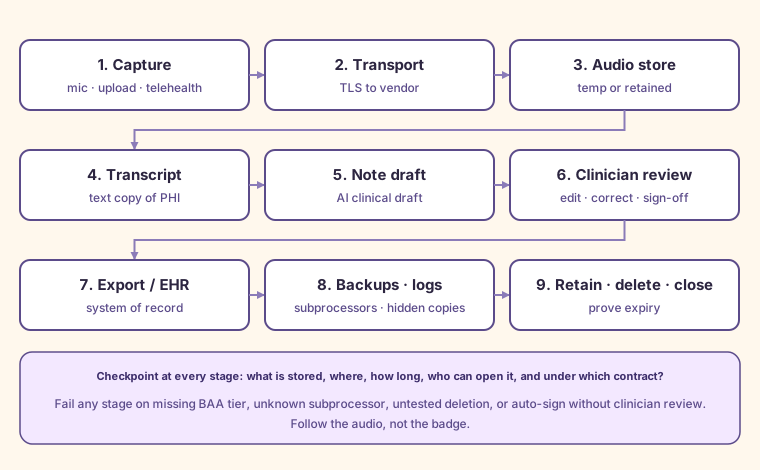
Use this map when you evaluate HIPAA compliant AI transcription vendors side by side. If two tools score the same on features, prefer the one that can answer every checkpoint in writing.
If you cannot answer those questions for a stage, the tool is not ready for PHI. Marketing FAQs that say “encrypted” without naming retention, subprocessors, or deletion tests are incomplete answers.
Replace trust badges with an evidence matrix
Do not award a pass from a logo, seal, or single FAQ sentence. Turn each claim into evidence, a setting, a test, and a fail condition.
| Vendor claim | Evidence to request | Setting to verify | Test to run | Fail condition |
|---|---|---|---|---|
| BAA available | Signed BAA naming your entity and the processing entity on the exact tier | Plan tier that includes the BAA | Open production only after an executed BAA on that tier | BAA only on a higher tier than you will buy, or unsigned template only |
| Encrypted in transit and at rest | Current security whitepaper or trust page plus BAA safeguard language | TLS for upload and app traffic; encryption at rest for audio and text | Confirm client and admin paths never fall back to cleartext export defaults | No written at-rest claim, or export drops to unencrypted email by default |
| Role-based access | Role matrix and unique-account requirement | Unique logins; no shared clinic password | Create two roles and confirm minimum-necessary views of audio, transcript, and draft | Shared login required, or every seat sees every recording |
| Audit events you can retrieve | Sample audit export or admin log description | Who viewed, exported, deleted, or changed retention | Export logs for a test session user | No retrievable events for view, export, or delete |
| Subprocessor list and notice | Dated subprocessor list and change-notice process | Which firms touch audio, transcript, or model inference | Match list to the live feature you enabled | Unknown model host or silent subprocessor swap |
| No training on identifiable client content | Contract or DPA clause, not only marketing | Training and evaluation toggles off for PHI | Ask for written confirmation on your plan | Training allowed by default, or “may use data to improve models” without opt-out |
| Configurable audio and transcript retention | Default days plus admin controls | Retention set to your policy before go-live | Create a test object and read the countdown | Indefinite retention by default with no control |
| Deletion and backup expiry | Deletion procedure and backup window | Soft-delete vs hard-delete; backup TTL | Delete a simulated session and re-check UI plus support confirmation | UI delete leaves indefinite backups with no expiry statement |
| Incident notice | BAA notice clocks and contact path | Who in your practice receives notice | Tabletop a lost-device or mis-share scenario | No clock, or notice only “without unreasonable delay” with no internal owner |
| Export and system-of-record boundary | Export formats and EHR path | What becomes the chart vs what stays in the tool | Export one finished note the way you will on a Tuesday | Locked data or chart-unusable export |
| Clinician review before sign-off | Product workflow that blocks auto-file | Mandatory review step | Attempt to publish without edit confirmation | Auto-sign or silent chart write |
| Offboarding and account closure | Closure checklist and data return or destruction terms | Seat removal and org delete | Remove a test user; request destruction letter on close | Orphaned seats keep audio access after departure |
Use the existing BAA packet when contract language is the bottleneck. The printable review is the business associate agreement for therapists guide and checklist.
Free PDF: BAA Review Checklist for Therapists
A printable review sheet for matching BAA clauses to how a therapy-practice vendor handles PHI.
- Vendor, covered-entity, plan-tier, owner, and review-date fields
- Checks for permitted uses, safeguards, subcontractors, and incident notice
- Return, destruction, export, and backup-lifecycle prompts
- Clause-versus-product evidence fields and counsel escalation questions
Free. We'll email the PDF link right away. We may also send the occasional therapist toolkit. Unsubscribe any time.
Where should we send the link?
We'll email the PDF link right away. You'll also get the occasional therapist toolkit. Unsubscribe any time.
✓ Check your inbox
We've sent you the PDF
The download link is on its way to your inbox, usually within a minute or two. The email will come from Emosapien (hello@team.emosapien.com); check your spam folder if you don't see it.
You're also on the weekly therapist toolkit list. Unsubscribe any time from the email footer.
Separate HIPAA safeguards from recording consent
The HIPAA Security and Privacy Rules govern how covered entities and business associates handle PHI. The technical safeguards in 45 CFR 164.312 cover access control, audit controls, integrity, authentication, and transmission security. Recording a session can also depend on applicable state law, professional rules, telehealth setting, payer or organization policy, and what you told the client. The practice-side controls belong in the wider guide to maintaining client confidentiality in mental health.
Do not treat a signed BAA as proof that recording is lawful in your jurisdiction. Do not treat a state consent form as a substitute for HIPAA safeguards. Verify both tracks:
- Federal and contractual track: BAA tier, safeguards, minimum necessary access, retention, breach notice, and workforce rules
- Consent and professional track: whether recording is allowed, how you disclose AI transcription, how refusal works, and where the consent lives in the chart
This page does not publish a fifty-state recording table. Confirm local requirements with qualified counsel and your board rules before the first real recording.
Solo checks versus group checks
Solo practice focus
- Plan tier that includes the BAA before any PHI trial
- Device lock screen, unique account, and no shared family login on the clinical laptop
- Consent language that matches the capture model you will use
- Retention and deletion defaults set before the first upload
- Export path into the system of record you already bill and audit from
Group practice additions
- Unique identities for every person who can open audio, transcripts, or drafts
- Role boundaries so front desk and billing do not browse full session audio by default
- Supervisor and coverage rules documented before go-live
- Contractor and vendor seats time-bound under the BAA
- Same-day offboarding when a clinician leaves
- Named owner for audit export and incident escalation after hours
If session audio is easier to open than a progress note, your access map is upside down.
Run the trial in the right order
Never upload real PHI to a free or uncontracted plan to “see if it works.”
- Obtain and review the contract and BAA for the purchased tier
- Document the data flow and subprocessors for the features you will enable
- Configure access, retention, and deletion settings
- Test with fictional or simulated content only
- Confirm the recording-consent and client-communication process
- Run three to five consented real sessions across your real caseload mix
- Score the sessions with the card below
- Stop if any non-negotiable fails
Five-session trial scorecard
Copy this table into your evaluation notes. Score each session 1-5. Fail the tool if any non-negotiable remains unmet after setup: executed BAA on the live tier, known subprocessors, working export, proven deletion or retain policy, or mandatory clinician review.
| Session | 1 | 2 | 3 | 4 | 5 |
|---|---|---|---|---|---|
| Transcription errors that change meaning | |||||
| Clinically meaningful omissions | |||||
| Edit time to sign-off (minutes) | |||||
| Export landed cleanly | |||||
| Deletion or retain setting confirmed | |||||
| Client experience notes | |||||
| Continue? (Y/N) |
Non-negotiables before any wider rollout: executed BAA on the live tier, known subprocessors, working export, proven deletion or retain policy, and mandatory clinician review. Charm on a demo call is not a control.
Transcript accuracy is not note quality
A clean transcript can still produce a weak or unsafe note. The treating clinician remains accountable for:
- Wrong speaker attribution
- Risk language that is missing, overstated, or invented
- Unsupported detail that did not occur in session
- Tone or content that does not match the chosen note format
- Treatment-plan continuity the draft ignored
AI transcription can cut typing time. It does not choose legal record categories for you, and it does not replace clinical judgment at sign-off.
Where Emosapien fits this checklist
Emosapien is therapy software, not a generic medical scribe. On current product terms relevant to this workflow:
- Live in-session browser transcription and audio upload or backfill for documentation support
- AI-drafted SOAP, DAP, BIRP, GIRP, and PIE notes with clinician review before sign-off
- Encryption in transit and at rest
- Business Associate Agreement available on Professional and Enterprise, not on the free plan
- Session content is not used to train public models
- Consent management and audit logging through the Safety and Compliance Agent
Those claims support evaluation. They do not make a practice automatically compliant. Configuration, consent, workforce access, and your signed chart entries still sit with the practice. When you want the product path after the scorecard, use the HIPAA-compliant therapy notes workflow page. Disclose the free-plan limit up front: no BAA means no identifiable PHI on that tier.
Closing checklist
Before you widen any HIPAA compliant AI transcription rollout:
- Capture model chosen on purpose, not by demo default
- BAA executed on the exact plan that will touch PHI
- Full copy map written from capture through backups and deletion
- Evidence matrix completed with fail conditions, not logos
- Recording consent and HIPAA tracks verified separately
- Solo or group access checks matched to who can open audio and drafts
- Simulated-data test passed before any real client content
- Five-session scorecard complete, with stop rules honored
- Clinician review required before anything becomes the record
If a vendor cannot survive that list, keep looking. The useful question was never whether the homepage said HIPAA compliant. It was whether you can follow the audio all the way to a signed, defensible note and a deletion you can prove.