How Emosapien Works: From Session to Signed Note in Minutes
Five steps from consent and record to a signed, EHR-ready clinical note. Built exclusively for licensed therapists and mental-health clinicians.
The five steps
- 01 Consent and record
- 02 AI listens
- 03 AI drafts the note
- 04 Review, edit, and sign
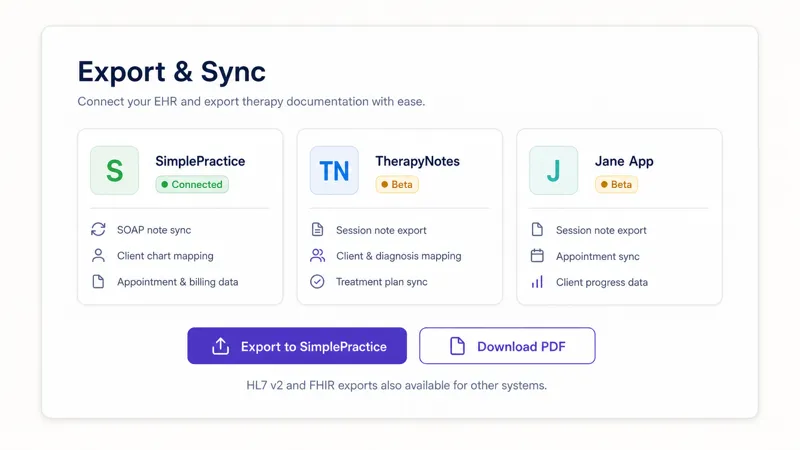
- 05 EHR sync
Session to signed note
The AI that works during the session, not just when it ends
Emosapien supports documentation while the work happens, so the draft already reflects the therapeutic context, not just a transcript. Walk through how Emosapien works, step by step, below. How it differs from generic scribing.
Consent and record
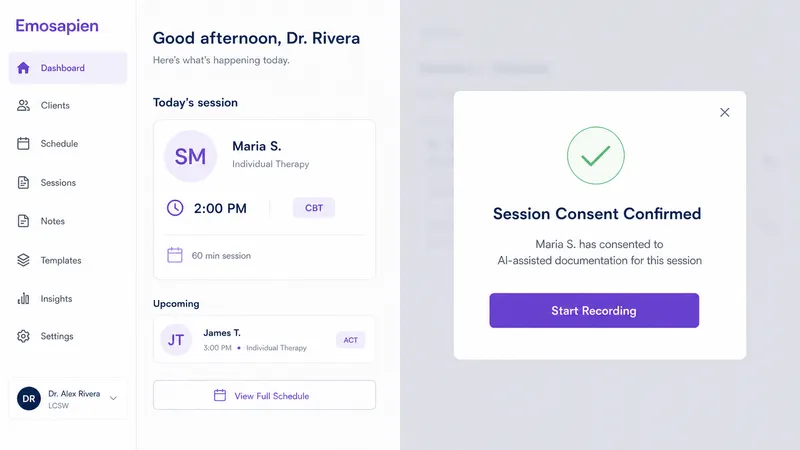
Confirm consent in one tap, then the Therapy Agent joins privately, capturing audio or the telehealth stream. Nothing is shared or stored until you hit record. Client data stays yours.
The AI listens and keys moments
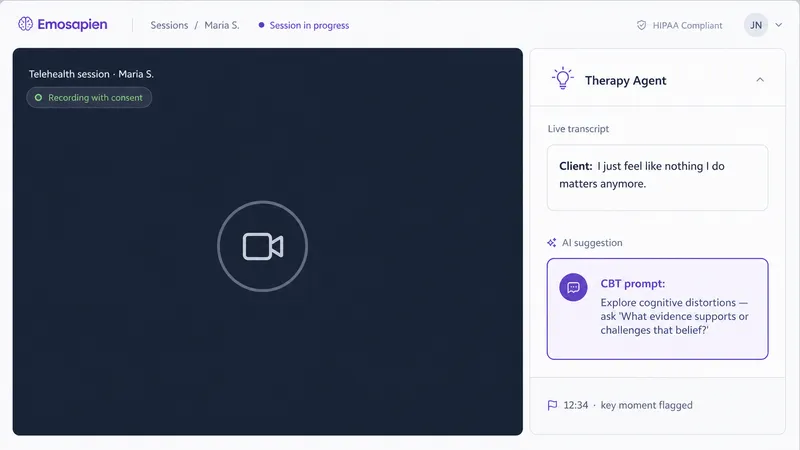
The Therapy Agent transcribes in the background and surfaces emotional patterns and modality-aligned prompts in a private sidebar only you can see. On an affect shift it offers a CBT reframe, an ACT values question, or a DBT distress-tolerance move. Key moments are timestamped on a session timeline.
AI drafts the SOAP, DAP, BIRP, or GIRP note
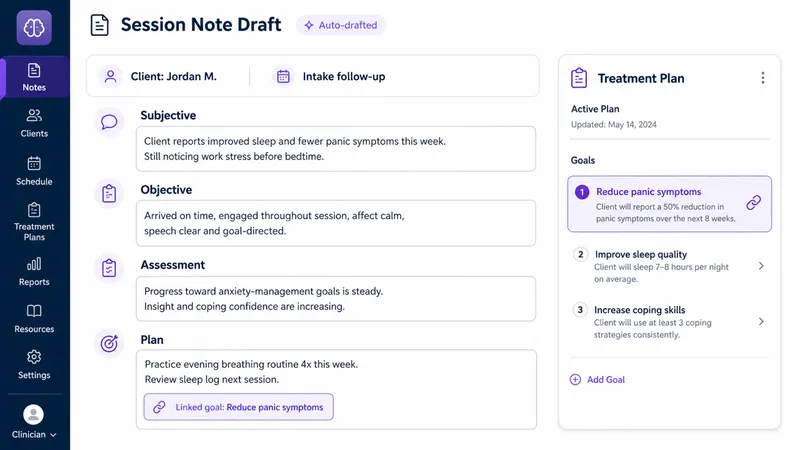
The Scribe Agent has already structured the note in your chosen format from live session context, not a bare transcript. The intervention used, the client response, and open treatment-plan goals land in the right sections, with modality language honored throughout. This is where Emosapien differs from a passive scribe.
Review, edit, and sign
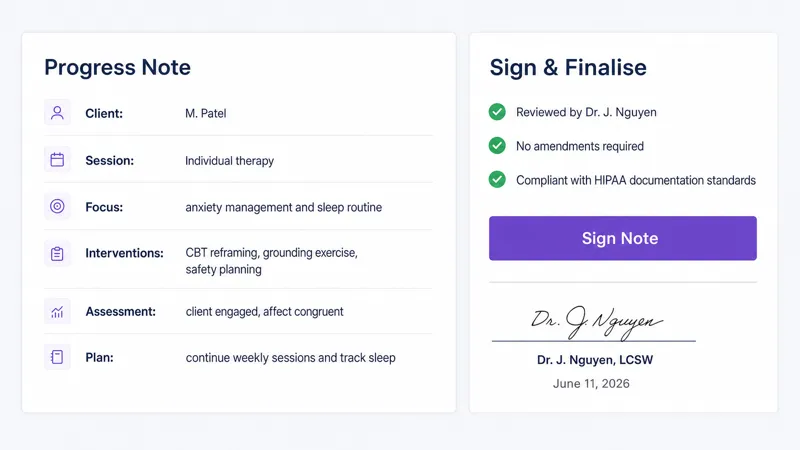
You read the draft, make any adjustments, and sign. Most therapists finish in under three minutes. Edit any field, override the AI wording, and add clinical nuance. The note is your clinical record; Emosapien just writes the first draft.
EHR sync
Keep the signed note inside Emosapien or export directly to your EHR. SimplePractice is the first direct integration; TherapyNotes and Jane are in beta. HL7 v2 or FHIR exports cover any other system, and built-in caseload search and progress tracking stay ready.
The AI agent team
A specialist agent behind every step
This is how Emosapien works under the hood: six agents divide the workflow, each with one job and one handoff.
Pre-session
Intake AI Agent
Captures client history before you enter the room so the session can focus on therapeutic work, not admin.
In-session
Therapy Agent
Listens alongside you, identifies emotional patterns, and surfaces modality-aligned intervention prompts in a private sidebar.
Documentation
Scribe Agent
Writes the SOAP, DAP, BIRP, or GIRP note from full session context, with treatment goals referenced in the right sections.
Treatment continuity
Planning Agent
Keeps the treatment plan updated across sessions, auto-linking goals to notes and flagging plan drift.
Between sessions
Engagement Agent
Sends clients guided check-ins, AI-assisted journaling prompts, and homework assignments to keep momentum going.
EHR and tools
Integrations Agent
Syncs signed notes to SimplePractice, TherapyNotes, Jane, or any FHIR-compatible EHR so your records stay in one place.
Why therapists choose Emosapien
Built for mental-health clinicians only
10,000+
therapists using Emosapien
140,000+
hours saved on admin work
97%
therapist satisfaction rate†
† Onboarding exit survey, n=1,240. Methodology disclosed on our About page.
“My SOAP notes used to take 25 minutes after each session. Now I read the AI draft, make a couple of edits, and sign in under three. On a ten-session day that frees up nearly four hours.” Rafael Cruz, LMFT, private practice, California
Common questions
Questions about how Emosapien works
Consent confirmation is a required step before each session. You tap to confirm that AI-assisted documentation fits your practice consent workflow before recording begins. Emosapien does not record without your explicit action.
SOAP, DAP, BIRP, and GIRP out of the box, plus modality packs for CBT, ACT, and DBT. You can switch formats per client or per session.
Yes. SimplePractice is the first direct integration; TherapyNotes and Jane are in beta. FHIR and HL7 v2 exports are available for other systems. Check the integrations page for the current list.
Yes. A standard AI scribe transcribes after the session and produces a note from the transcript. The Emosapien workflow is different: it participates during the session, tracking the intervention used, the client response, and the modality framing, then writes those into the clinical note so the chart reflects the actual therapeutic work.
Around 10 minutes. Sign up, choose your default note format and modality, run a test session, and you are documenting your first real client the same day. The Free plan is ongoing (10 sessions per month) with no credit card required. See all plan options on the pricing page.
Ready to try the workflow in your own sessions?
Start free with 10 sessions per month. No credit card required.